Everyone has their own way of looking at the program stack. Some say it grows up, others say it goes top to bottom.
In this sketch I present to you the number line representation of the stack to clear up the confusion once and for all.
It should also help understand what the Linux kernel is doing when a program gets executed.
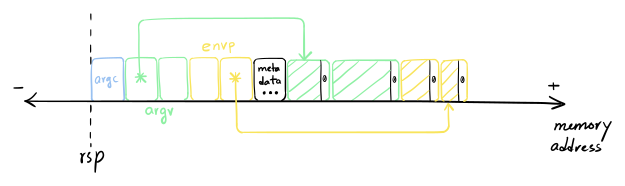
Higher memory addresses are towards the right.
The kernel starts there by placing environment strings in the striped yellow boxes, going from right to left.
The stack grows towards negative addresses.
The environment strings are all terminated by a null byte, indicated by the 0. Any such string is called a C string.
Towards the left, the kernel puts the command line arguments in the striped green boxes, again as C strings.
It places some metadata after that which we will gloss over.
For the curious: The metadata includes auxiliary vector
auxv, and auxiliary info blocks referenced by theauxv.
Further left are the envp pointers in yellow. These are fixed length pointers that reference the environment variable strings placed previously.
While the environment variable strings themselves are not fixed in length and need the null terminator, the fixed length of these envp pointers
are equal to the word size of the machine’s architecture. For exmaple: 64-bit machine means 64-bit pointers.
Similarly, there are the argv pointers in green, each pointing to a separate command line argument.
Note how the argv and envp pointers are all intentionally drawn of the same length compared to the strings which may very well vary in size.
Finally there’s the argument count, argc in blue. This is the number of command line arguments supplied to the program.
This is where the stack pointer rsp rests when the program is just started. If we write raw assembly to read a whole machine word from the memory address [rsp], we get
back the argument count.
As the program uses more variables and calls function, the stack generally grows to the left with the stack pointer taking on smaller and smaller values.
Once functions are finished, the “grown” space is popped off and the rsp again points to a larger value.
Hope you found this useful.